


VALAR Systems
The Ropener
The Ropener
Couldn't load pickup availability
Wake up to sunlight instead of an alarm. Have the curtains close themselves at dusk, or while you're away. The Ropener is a smart curtain opener that retrofits onto your existing curtain rod — no new hardware track, no replacing what you have. Watch the video in the gallery to see it move.
Quiet enough for the bedroom
The Ropener drives its motor with a Trinamic TMC2209 using StealthChop — the same silent-drive technology in premium 3D printers. It's quiet enough to run while someone's sleeping, and at lower speeds (adjustable in the web interface) it's completely silent. If you've returned a curtain robot because of motor whine, this is the fix.
Designed to disappear
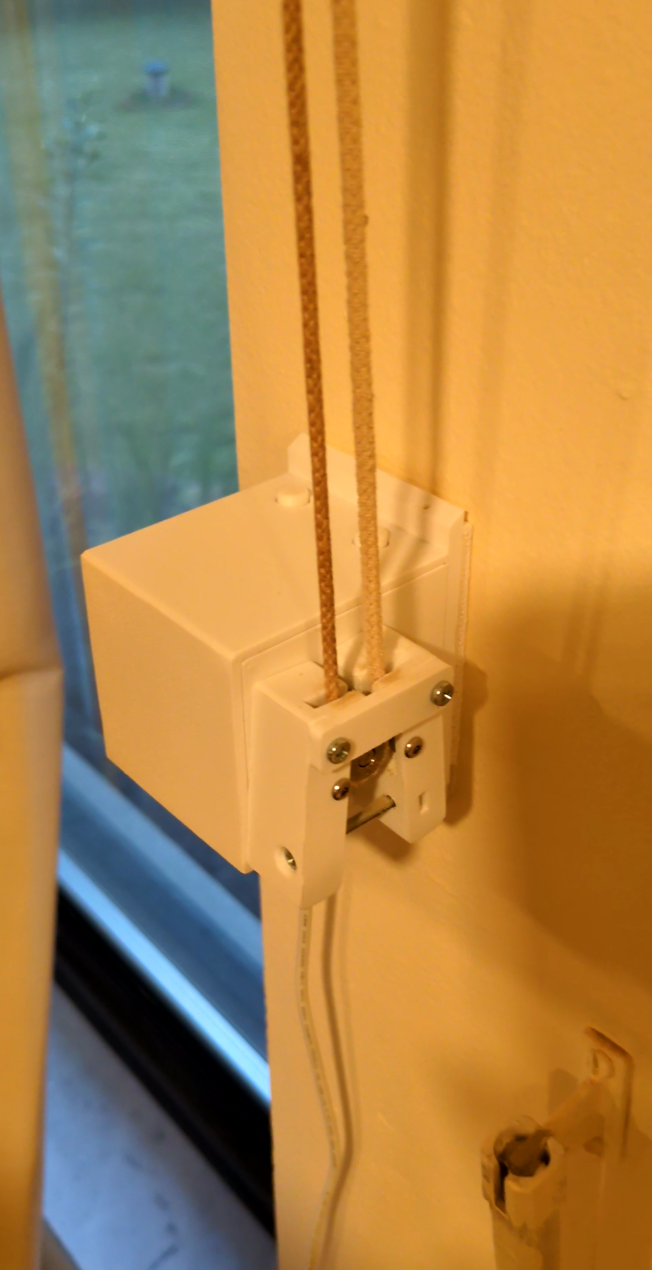
Everything is white — the housing, the carriages, the rope, the power cable and barrel extension. Mounted beside white trim and curtain hardware, the Ropener blends into the room instead of announcing itself. No black plastic box hanging off your curtains.
One panel, a pair, or a whole wall
The Ropener isn't limited to center-opening pairs. Run a single panel, the standard two-panel setup, or attach extra carriages along the rope to move 6, 8, or more panels with one motor — every panel moves together, perfectly in sync. It's how you automate a wall of curtains or a wide bay window for the price of one device. Extra carriages are available on our replacement parts page — or print as many as you like, free, from the open-source files.
Choose your kit
DIY (no prints): all hardware and electronics — you print the plastic parts yourself from the open-source files. The lowest-cost option for makers with a 3D printer.
DIY (with prints): the same kit with the full printed set included (white PLA), so you don't need a printer.
Assembled — Ready to Use: fully built and tested, ready to mount.
Both DIY tiers assemble in about 20 minutes once you have the printed parts. Each tier is also available with the upgraded VAL3100 controller — see Choosing your controller below.
Choosing your controller
Standard (VAL3000, ESP32-C3): every regular kit includes our VAL3000 controller with a Wi-Fi radio. It's what most Ropeners in the wild run on, and it's the right choice if your smart home speaks Wi-Fi — which is most smart homes.
+ VAL3100 (ESP32-C6): pick a "+ VAL3100" kit and we swap in the VAL3100, built on the ESP32-C6 — the same board with Thread, Zigbee, and BLE radios alongside Wi-Fi. Everything else is identical: same TMC2209 driver, same connectors, same mounting. Worth the $10 if you're building toward Matter-over-Thread, want lower-power protocols available, or just want the newer chip in the box. The stock Ropener firmware runs over Wi-Fi on both controllers; the C6's extra radios are there for where the smart-home ecosystem is heading and for custom firmware.
Power
Select US, EU, or UK to include a 24V/1.5A power supply with the right plug, or None to supply your own 24V/1.5A adapter.
Rope length
30 ft is enough for most installs. Choose 50 ft only if your run needs it — see Choosing your rope length below for the sizing math.
Works with your smart home — or without one
The Ropener ships with ESPHome already installed — no flashing, no hub required. On first power-up it creates a Wi-Fi hotspot; connect with your phone, join it to your network (2.4 GHz), and control it from any browser.
Home Assistant discovers it automatically for full automation. Prefer Apple Home, Google Home, or Alexa? The free Matterbridge add-on exposes it to all three. And with no app account and no cloud dependency, it keeps working even if we don't.
Warranty: a year, and a real human
Every Ropener is covered for one year against defects. If something breaks, you email the person who designed it — and we'll either walk you through the fix, ship you a replacement board or part free, or take the whole unit back for a refund. And because we're open source: custom firmware and modifications don't void your warranty (a mod only affects coverage if it actually caused the failure). Consumables like rope and printed wear parts are cheap and always in stock on the parts page.
100% open source
Everything is open source — the ESPHome firmware YAML, the STEP files, and the 3D print files all live in the Ropener GitHub repository. If you chose DIY (no prints), that's where your print files are. Fork it, modify it, repair it — it's yours.
Building it
Build guide is here.
Installation guide is here.
.gif)
Specifications
| Panels | 1, 2 (included), or many — add extra carriages for 6, 8+ panels on one motor |
| Open time | ~3–5 seconds for a typical window at full speed; slower speeds are silent |
| Pulling force | Up to ~15 lb |
| Maximum span | No width limit — force, not distance, is the constraint |
| Noise | Quiet at full speed (TMC2209 StealthChop); silent at reduced speed |
| Speed | Adjustable from the web interface |
| Color | All white — housing, carriages, rope, and power run — designed to blend in |
| Controller | VAL3000 (ESP32-C3, Wi-Fi) or VAL3100 (ESP32-C6, Wi-Fi/Thread/Zigbee/BLE) |
| Connectivity | 2.4 GHz Wi-Fi; browser control, no hub or cloud account required |
| Integrations | Home Assistant (native); Apple Home, Google Home, Alexa via Matterbridge |
| Power | 24V / 1.5A (included with plug options, or bring your own) |
| Rope | 30 ft or 50 ft included |
| Printed parts | White PLA (included with-prints and assembled tiers) |
| Warranty | 1 year; repair-first, free replacement parts; mods don't void it |
| Firmware | ESPHome, pre-installed, fully open source |
Before you buy
Lead time: every kit is built to order in Oregon and ships in 1–2 weeks.
Grommet curtains: we highly recommend using this curtain glide tape. Without it, most grommet curtains get stuck halfway when closing.
3D prints: choose DIY (no prints) to print your own — everything prints on one platter in about 9 hours (8h 44m), with the files on the GitHub page — or choose DIY (with prints) to have the full set included.
Will it work for your curtains?
There's no maximum width — the motor can pull any length of rope. The one real limit is pulling force: up to about 15 lb. That's not about how much your curtains weigh, but how hard they are to slide along the rod — and longer, heavier, or stiffer curtains create more drag. Most curtains sit well within range. If yours are wide or heavy, the glide tape (above) cuts that drag substantially and is the fix, especially on grommet curtains. The same 15 lb budget applies when running many panels — more panels means more drag, so the glide tape matters most on multi-panel installs.
Choosing your rope length
The rope needs to be at least twice as long as the distance it needs to travel, plus some distance for it to attach to the wall, below the curtains. For example, if your curtain rod is 10 feet wide, you need at least 20 feet of rope. Additionally, we recommend placing it 2 feet below the curtain, which will require an additional 4 feet of rope. So a 10-foot rod needs at least 24 feet of rope. 30 ft covers most setups; size up to 50 ft for wide spans or a low mount point.
How it works
The diagram below shows how the rope moves the curtain. It's from an earlier revision, but the mechanism is identical.
The motor is attached below #4, and a pulley spins the rope. On the opposite end is the end pulley #1. In the center are the two carriages #2 and #3 that are attached to the rope. These are attached to the front of each curtain panel and move it back and forth along the rod. For single-panel setups, use one carriage; for multi-panel walls, add a carriage per panel anywhere along the rope.


Excellent design that fit directly onto my existing rope-pull curtains. It's run silently and integrated very well with Home Assistant while still allowing manual adjustment with buttons.
I'm back on the waiting list for two more!
The design is really well thought out! With the latest set of videos and written instructions anyone should be able to assemble the reopener!
I've had it running in my house for over 2 weeks now, after some initial tightening of the arms ( this is expected ) the system has worked flawlessly!
I appreciate the Esphome installation, makes home assistant integration easy. This is hands down one of my favorite projects to date.
Daniel is easy to reach and even sent me some spare parts after he implemented some feedback I gave. I would 100% buy again!
Hi Umaid, I'm so glad to hear you're enjoying the Ropener and that the assembly process was smooth for you! It's also great to know the Esphome integration and my support was helpful. Thanks so much for your kind words and for sharing your experience.
-Daniel
Fantastic! Works perfectly. Only solution I could find that allows curtains with ropes and not beads
Great product, and well priced compared to alternatives. Got my two up and running with only a bit of tweaking of the tension. Paired straight away with home assistant.
Will be buying more.
This thing is great. I've been looking for a good way to automatically open/close my curtains for awhile and haven't been a fan of any of the out-of-the-box solutions (either too expensive or part of yet another obscure ecosystem).
I found this mentioned in a reddit comment by the creator and instantly had my friend print me out the parts while I waited for the motor/other parts to arrive.
The way this device is set up makes a lot of sense and putting it together was kind of like a puzzle (which I love). Nothing too confusing, and the linked assembly/installation videos are a great help.
It looks great and I'm about to order one more for another room.
Perfect ! Reely nice projet and pretty easy with claude for the flashing parr
This is the perfect solution for automating curtains if you don't want a track. I'm tweaking it to fit my needs and the design makes it simple to change from split open/close to just left/right. All parts are great quality, videos are detailed, and much easier than sourcing all the parts separately.