

Valar Systems
Blipscope — Live Aircraft Radar for Your Desk
Blipscope — Live Aircraft Radar for Your Desk
Couldn't load pickup availability
A small radar scope that shows the aircraft flying near you, live. Tap one and it tells you what it is, who's flying it, and where it's going.
No app. No account. No subscription. Plug it in, tell it where you are, and it starts sweeping.
Choose your edition
Assembled — Ash Grey or Bone White. The finished instrument: enclosure, weighted base, panel-mount USB port, a 6 ft braided USB-A to USB-C cable and a quick-start card. Ready to plug in.
DIY Kit. Everything except the plastic: the flashed board, the FPC antenna, the USB-C panel-mount cable, every screw and nut, the steel weights for the base and the non-slip pads. Print the enclosure yourself from our free files on Printables and MakerWorld. Nothing else to buy.
It's a real instrument, not a screen with a picture of one.
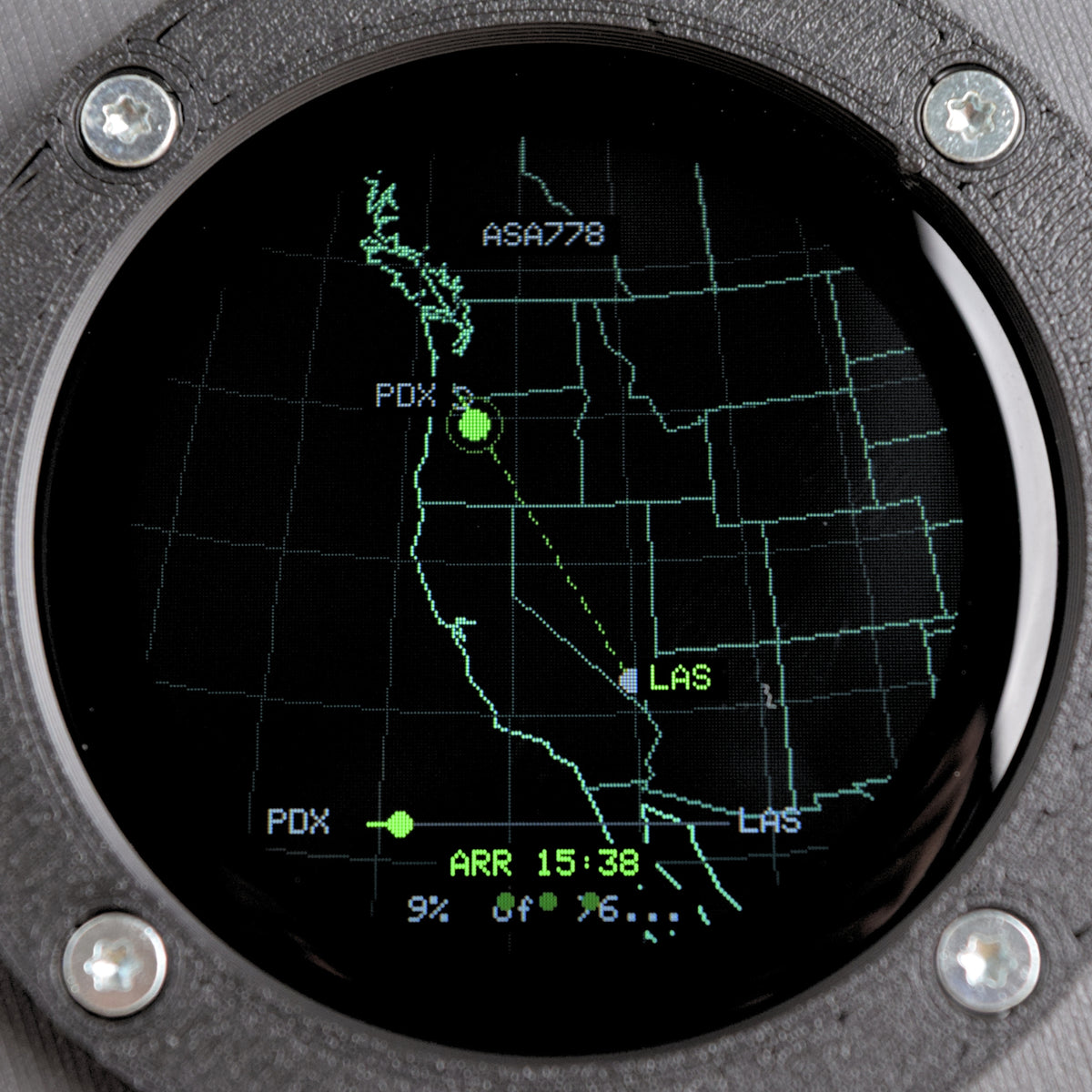
Blipscope shows the aircraft actually overhead — position, altitude, heading, updated continuously — on a 1.28-inch round display under curved glass. The sweep turns, contacts appear where the aircraft are, and between updates it dead-reckons their track the way a radar scope always has.
Tap an aircraft and the card opens: registration, type, operator, and the route it's flying where that's known. A Cessna doing circuits at the local field. A 737 at 36,000 feet going somewhere you're not.
Military aircraft come up flagged MIL in orange — worked out from the ICAO 24-bit address block, entirely on the device, with no lookup and no account. Helicopters read HELI in violet, from the ADS-B emitter category. Rescue, medevac, police, and manufacturer test flights read SPC in blue, from the callsign. All three work offline, on your own receiver, with every enrichment service switched off.
An aircraft squawking 7500, 7600 or 7700 pulses a red ring at the edge of the screen. Military pulses orange. Both can be set to override night dimming, because the whole point of an alert is that you see it.
Tap a contact. Then tap again.
The first card is the photograph of the actual aircraft if one is available, or a stock photo if one is not. Tap through for the full data: registration, type code and full type name, operator, route, altitude, speed, distance and bearing from you. Swipe up to pin it and the radar keeps it under the crosshair.
Look up.
Set a distance, and when something crosses inside it the screen flashes a cyan ring — so you can put your head out the door and actually see the thing that's on your desk. Optional phone alert to go with it.
Watch a tail number. Follow a flight.
Give it a watchlist — callsigns, tail numbers, ICAO hexes, or whole type codes — and your phone buzzes when one of them goes over. Or pick a single aircraft to follow: the scope draws its track and alerts you when it takes off, when it lands, and when the signal drops.
The logbook, and the leaderboard.
Blipscope keeps a permanent lifelist of every aircraft type, airline, country of registry, and route airport it has ever seen from your location. First sighting of anything new gets a gold NEW flag. It holds your lifetime records too — highest, fastest, and closest contact ever, each with the callsign and the date.
Turn on the optional leaderboard, pick a spotter name, and your claim count goes up against every other opted-in scope — rarer type codes score higher.
Set it up the way you actually sit.
Rotate the scope's heading so the top of the screen matches the way your window faces — then a contact at the top of the display is genuinely out that window. When the sky empties it becomes a clock. It dims itself at night on your local sunrise and sunset. Sweep, sweep fade, trails, altitude coloring, airport labels, and heading-aware aircraft markers all toggle individually, in kilometers or miles. And it'll publish aircraft count, nearest flight, and overhead and military flags to MQTT with Home Assistant auto-discovery, if that's your kind of house.
Built like something that belongs on a desk.
A machined-look instrument ring holds the glass with four exposed screws. The body is 3D-printed in matte PLA — Ash grey or bone white — over a black chassis and a weighted base that doesn't shift when you tap it. It's heavier than it looks, which is the point.
Set-up is three minutes.
Plug it in. Join the Wi-Fi hotspot it creates. Open its address in a browser, paste in your coordinates, and save. Aircraft appear within seconds. There's no app to install and no account to make, because there isn't one.
The cloud service is included. Forever.
Aircraft data comes from adsb.fi, with adsb.lol as backup — volunteer-run community networks we sponsor. Every Blipscope talks to our servers, not theirs, so the networks see one request per area instead of one per device. No subscription, no expiry, no upsell.
Better still with your own receiver.
Point Blipscope at your own ADS-B receiver — about $30 of USB radio and antenna — and you get one-second updates, radar that works during an internet outage, and aircraft too low or close for the networks to cover. Your receiver can feed the community networks at the same time.
Open source.
The firmware is public and updates arrive over Wi-Fi automatically. ESP32-S3, 1.28-inch 240×240 IPS display, capacitive touch under curved glass.
What's in the box
Assembled — Ash Grey / Bone White
- Blipscope, assembled and tested
- USB-A to USB-C cable, 6 ft, braided
- Quick-start card
DIY Kit
- Flashed ESP32-S3 board with the 1.28-inch round display
- 2.4 GHz FPC antenna
- USB-C panel-mount extension, 10 cm
- 4 × M2 screws for the board
- 10 × M2 × 10 thread-forming screws for the bezel and housing
- 2 × M2 pan-head screws and 2 × M2 nuts for the USB panel mount
- 4 × steel weights for the base
- 4 × non-slip pads
The DIY Kit has no enclosure and no USB cable to the wall — print the enclosure from our free STEP, STL and 3MF files (Printables and MakerWorld) and use any USB-C cable you already have.
No power adapter is included with any edition. Blipscope runs from any USB port or phone charger you already have.
Specifications
- 1.28-inch round IPS display, 240×240, curved cover glass
- Capacitive touch
- ESP32-S3, Wi-Fi, 16 MB flash / 8 MB PSRAM
- USB-C powered, ~2.5 W
- Approx. 66 × 66 × 55 mm, weighted base (assembled)
- Matte PLA body, black chassis, 3D-printed in Oregon (assembled)
- Open-source firmware, automatic over-the-air updates
- Cloud service included — no subscription, no account
Questions
What's the difference between the DIY Kit and Assembled?
The Kit is everything except the printed parts — board, antenna, panel-mount cable, all hardware, weights and pads — for people who'd rather print the enclosure themselves. Assembled is the finished instrument with enclosure, weighted base, cable and card, ready to plug in.
Do I need a subscription?
No. Cloud service is included with the device, permanently. There's no account to create.
Does it need an app?
No. Set-up happens in a browser on any device on your network.
How do I tell it where I am?
You paste your latitude and longitude into its settings page during set-up. Instructions are on the card in the box and at valarsystems.com/blipscope.
How far can it see?
That depends on your data source. Using the included cloud service, you set a range up to about 160 km. With your own ADS-B receiver, it's limited by your antenna and horizon.
Can I use my own receiver?
Yes — that's the best version of it. One-second updates, works without internet. Setup guide at valarsystems.com/blipscope.
Is it accurate?
It shows what aircraft broadcast about themselves over ADS-B, the same data flight-tracking sites use. It isn't a certified instrument and isn't for navigation.
What if my Wi-Fi changes?
There's a reset on the device's Stats screen, and a touch-and-hold reset at power-on. Both are on the card and the support page.